A thoughtful gift for a content creator can support the whole process, from recording a clear voice to organizing files and shaping a comfortable workspace.
These 14 ideas include practical tools for creators at home, at a desk, or on the move, with options for different interests and budgets.
14 Gift Ideas for Content Creators
MAONO Wave T5 Mini Wireless Lavalier Microphone

- Four one-tap voice filters give creators presets for everyday recording, vlogs, storytelling, and a broadcaster-style tone.
- The charging case brings total use to 40 hours, useful for longer recording days away from an outlet.
- The receiver has a Type-C port for charging a phone while connected.
Best Gift For: A mobile creator who records interviews, vlogs, or voiceovers on a phone or camera.

FIFINE T669 USB Condenser Microphone Kit

- Plug-and-play USB connects to a PC or laptop without additional hardware or drivers.
- The cardioid capsule captures sound from the front and helps avoid ambient noise.
- The kit includes an adjustable boom arm and double pop filter for a desk recording setup.
Best Gift For: A podcaster or voiceover creator building a home recording setup.
SABRENT USB-C and USB-A SD Card Reader

- USB-C and USB-A connectors work with newer devices and traditional USB-A ports.
- Dual slots read SD and Micro SD cards used in cameras and other devices.
- The compact design is easy to carry in a pocket, laptop bag, or camera case.
Best Gift For: A photographer or video creator who transfers memory-card files to different devices.
HUANUO FlowLift Single Monitor Mount

- Fits 13–32 inch monitors weighing 4.4–19.8 lbs, with 75x75mm and 100x100mm VESA patterns.
- Tilt the monitor from -50° to +85°, swivel ±90°, and rotate 360° to adjust your viewing position.
- The mount offers either a C-clamp or grommet installation option.
Best Gift For: A desk-based creator who wants to adjust a compatible monitor's position.
Nulaxy Pull-Out Height Adjustable Laptop Stand

- The pull-out design lets users change between sitting and standing positions.
- Its height adjusts from 1.2 inches to 20 inches.
- Folds compactly to save space on your desk, and works at home or in the office.
Best Gift For: A laptop creator who alternates between sitting and standing at a desk.
TP-Link AXE5400 Tri-Band WiFi 6E Router

- The router includes a 6 GHz band for responsive video chatting and gaming.
- OneMesh support can connect to a TP-Link OneMesh Extender for whole-home coverage.
- A modem is required for most internet service providers.
Best Gift For: A creator whose home setup shares internet for video calls, streaming, and other connected devices.
SABRENT USB-C 6-Port Hub and M.2 SSD Dock

- An HDMI port supports an external display at up to 4K at 60Hz on compatible devices.
- The internal M.2 slot supports SATA or NVMe SSDs.
- The hub is designed for Windows, macOS, and Linux systems.
Best Gift For: A laptop creator who wants a hub for peripherals, an external display, and portable storage.
SteelSeries Arctis Nova 7P Wireless Headset

- Wireless connection supports PC, PlayStation, Switch, or tablet through a USB-C dongle.
- A mobile device can connect directly for audio or calls mixed with game audio.
- The retractable microphone can be tucked away when not in use.
Best Gift For: A creator who games, edits, or takes calls across compatible devices.
SteelSeries Apex Pro HyperMagnetic Gaming Keyboard

- Per-key actuation offers 40 adjustment levels.
- The OLED display shows information from games and apps.
- USB passthrough lets users connect another USB-powered device.
Best Gift For: A creator who spends long sessions typing, editing, or gaming at a computer.
SteelSeries Aerox 3 Wireless Gaming Mouse

- The purposefully designed holey shell reduces weight to 68g.
- The mouse connects over 2.4 GHz wireless or Bluetooth 5.0.
- The interior is shielded from water splashes, dust, and dirt, with an IP54 rating.
Best Gift For: A creator who prefers a lightweight wireless mouse for computer work and gaming.
Audioengine A2+ Wireless Computer Speakers

- The compact powered speakers are designed for nearfield listening on desks.
- A built-in 24-bit DAC connects to a computer through USB-C.
- Wireless Bluetooth and wired inputs offer multiple ways to connect devices.
Best Gift For: A creator who listens to music, podcasts, or audio from a home desk.
MagSafe-Compatible 5000mAh Wireless Magnetic Power Bank

- The 5000mAh capacity is designed to provide up to one full charge for an iPhone 16.
- It can charge wirelessly and provide USB-C output for wired charging.
- It is not compatible with non-magnetic cases.
Best Gift For: A mobile creator with a compatible MagSafe iPhone and magnetic case who wants portable backup power.
Phomemo D30 Bluetooth Label Maker
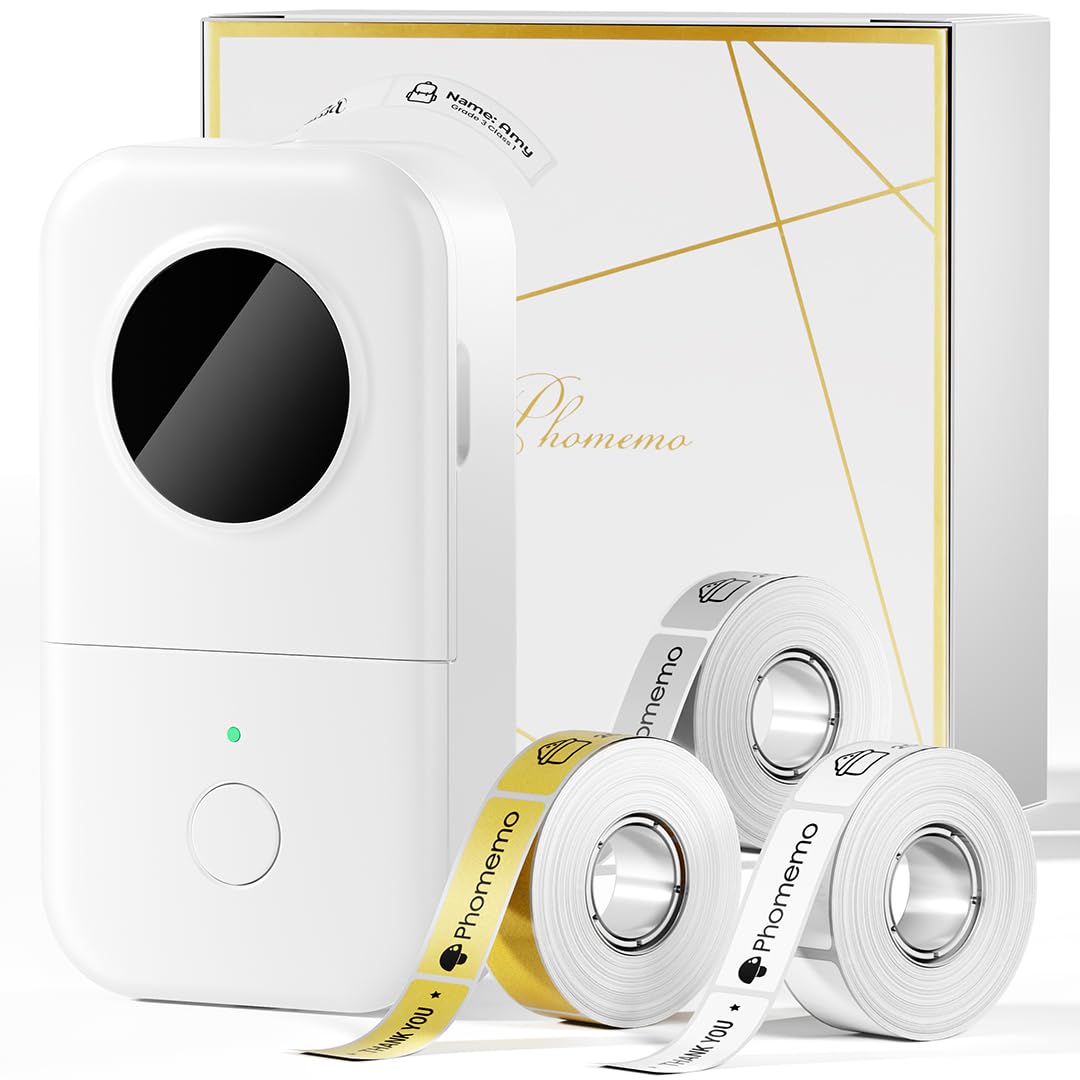
- The label maker prints without ink, toner, or ribbons.
- The app includes templates with symbols, frames, and fonts.
- Bluetooth printing works with mobile devices, and the printer is designed to be portable.
Best Gift For: A creator who likes labeling cables, equipment, supplies, or project files.
HP Sprocket Select 2.3x3.4 Instant Photo Printer

- Prints sticky-backed photos from iOS and Android devices.
- The app offers frames, filters, and tools for making custom stickers.
- The printer has a rechargeable, pocket-sized design for travel.
Best Gift For: A photo creator who enjoys turning smartphone pictures into small printed keepsakes.
Choosing gifts for content creators by workflow
When choosing gifts for content creators, start with the part of the process the recipient enjoys most or wants to improve. Someone who records interviews may appreciate support for capturing voice, while a desk-based editor may value a more comfortable workspace or an easier way to move files.
Think about where the creator works. A home podcaster has different needs from someone filming outside or traveling between locations.
For a mobile setup, consider portability and the devices the person already carries; for a permanent desk, consider space, connections, and how the gift fits the existing routine.
If you are unsure what they need, notice what slows them down: a crowded desk, scattered files, a laptop with few ports, or difficulty recording in a changing environment. A gift that removes one small friction point can be more useful than a tool that asks them to change their whole process.
Balancing budget and usefulness
A modest gift can still feel well chosen when it solves a specific everyday problem. Accessories for file transfers, phone power, or desk organization can suit a smaller budget, while a more involved setup item may make sense when you know the recipient’s equipment and preferences.
For gifts for content creators, think about the full setup cost as well as the item itself. Some tools depend on compatible phones, computers, ports, monitor fittings, or memory cards.
Check current product details and compatibility before buying, especially when the gift needs to work with equipment they already own.
For a larger purchase, consider whether the recipient would use it regularly and whether it fits their workspace. If you are unsure about a technical match, a gift receipt or a conversation about their setup can help preserve the thoughtfulness without guessing.
Personal touches for gifts for content creators
Personalization can be as simple as choosing a tool that matches the recipient’s creative routine. A person who loves documenting trips may value a different kind of support than someone who records a weekly show or spends evenings editing at a home desk.
Pair the gift with a small note explaining why it made you think of them: perhaps it could help with a recording day, make a workspace feel more comfortable, or help preserve favorite photos. The note can make a practical purchase feel personal without adding clutter or assuming how they work.
Presentation can also reflect their style. Wrap a useful desk accessory with a handwritten card, or package a compact item alongside a favorite snack for a filming day.
If you are gifting a device that needs setup, include a short offer to help check compatibility or get it ready together.
Last-minute gifts for content creators
For gifts for content creators when time is short, choose something whose fit is easy to confirm. A compact accessory may be simpler to match than a device that depends on a particular computer, phone, or workspace.
Check the recipient’s existing equipment and current compatibility information before placing an order.
Look at delivery estimates for the recipient’s address and allow time for any setup or accessories the gift might need. Estimates can change, so avoid promising a specific arrival date unless the retailer confirms it at checkout.
If timing is uncertain, a printed card with a clear note about the planned gift can still mark the occasion.
When you cannot confirm a match quickly, choose a flexible option or ask someone close to the recipient for a discreet pointer. A brief message about what they use can prevent a mismatch.
Thoughtful timing includes leaving room for the recipient to choose a variant, connection type, or color that suits their setup.
Making the gift easy to enjoy
A useful gift should be straightforward to bring into the recipient’s routine. Keep any included parts together, share the receipt when appropriate, and make sure they can find the compatibility details and setup information when they are ready to use it.
For devices, check dimensions, connection requirements, and the space available before buying. For desk equipment, consider where it will sit and whether the current setup can support it.
These small checks help turn a promising idea into something the creator can use comfortably.
The best gesture is attention to what they make and how they make it. Whether the gift supports recording, editing, organizing, or sharing, a little consideration of their habits can help it feel personal and genuinely useful.